Introduction to Cloud Computing

Step‑by‑Step Guide: Understanding Cloud Computing, Cloud Providers, Service Models, and Deployment Types

Cloud computing has transformed the way organizations build, deploy, and manage IT infrastructure. Instead of relying solely on physical servers and data centers, businesses can now leverage on‑demand resources from providers like Microsoft Azure, Amazon Web Services (AWS), Google Cloud Platform (GCP), and Oracle Cloud Infrastructure (OCI).

In this guide, we’ll walk through the fundamentals of cloud computing — what it is, the major providers, service models (IaaS, PaaS, SaaS), and cloud deployment types. This will set the foundation for deeper Azure‑specific blogs in our series.

If you’d like to watch a step‑by‑step walkthrough of Windows server 2022 installation, Promote a DC, Windows 11 installation, or Domain join, please visit our post-

      1. Create a Virtual Machine and Install Windows server 2022
      2. How to Promote a Server to Domain Controller (DC).
      3. How to install Windows 11 with/without TPM.
      4. How to Join a Windows Client to a Domain.

1. What is Cloud Computing?

Cloud computing is the delivery of computing services over the internet (“the cloud”). Computing services include common IT infrastructure such as Servers, virtual machines, storage, databases, networking, software, analytics, and intelligence. For more information you can visit Microsoft learn page.

Key Benefits:

  • Scalability: Scale resources up or down instantly.

  • Cost Efficiency: Pay only for what you use.

  • Reliability: High availability and disaster recovery.

  • Security: Advanced compliance and protection features.

  • Flexibility: Access from anywhere, anytime.

2. Major Cloud Providers

Here are the leading public cloud platforms:

ProviderStrengthsCommon Use Cases
Microsoft AzureEnterprise integration, hybrid cloud, securityEnterprise workloads, Windows/ Linux VMs, AI/ML, DevOps
Amazon Web Services (AWS)Largest ecosystem, global reach, innovationStartups, scalable apps, serverless computing
Google Cloud Platform (GCP)AI/ML leadership, Kubernetes expertiseData analytics, AI workloads, containerized apps
Oracle Cloud Infrastructure (OCI)Strong database services, enterprise ERP integrationOracle DB workloads, enterprise applications, financial systems

Each provider offers similar core services but differentiates in ecosystem, pricing, and specialized tools.

3. Cloud Service Models

Cloud services are categorized into three primary models: IaaS, PaaS and SaaS.

Infrastructure as a Service (IaaS)

    • Provides virtualized computing resources (VMs, storage, networking).
    • Example: Azure Virtual Machines, AWS EC2.
    • Best for: IT teams needing full control over OS, apps, and configurations.

Platform as a Service (PaaS)

    • Provides a platform for building, testing, and deploying applications without managing infrastructure.
    • Example: Azure App Service, AWS Elastic Beanstalk.
    • Best for: Developers focusing on code, not servers.

Software as a Service (SaaS)

    • Delivers software applications over the internet.
    • Example: Microsoft 365, Google Workspace.
    • Best for: End‑users needing ready‑to‑use apps.
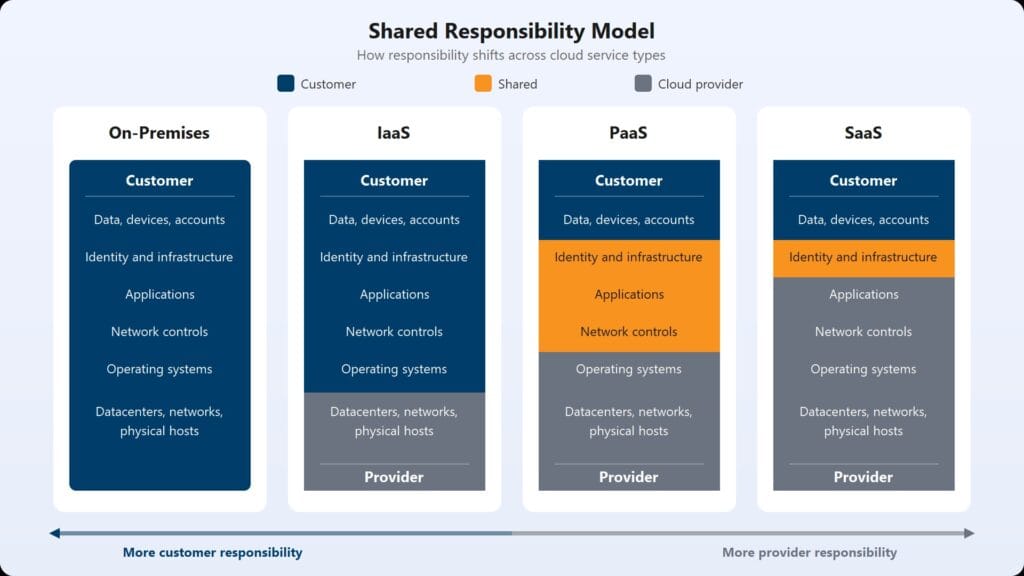
Cloud Computing - Cloud Service Models

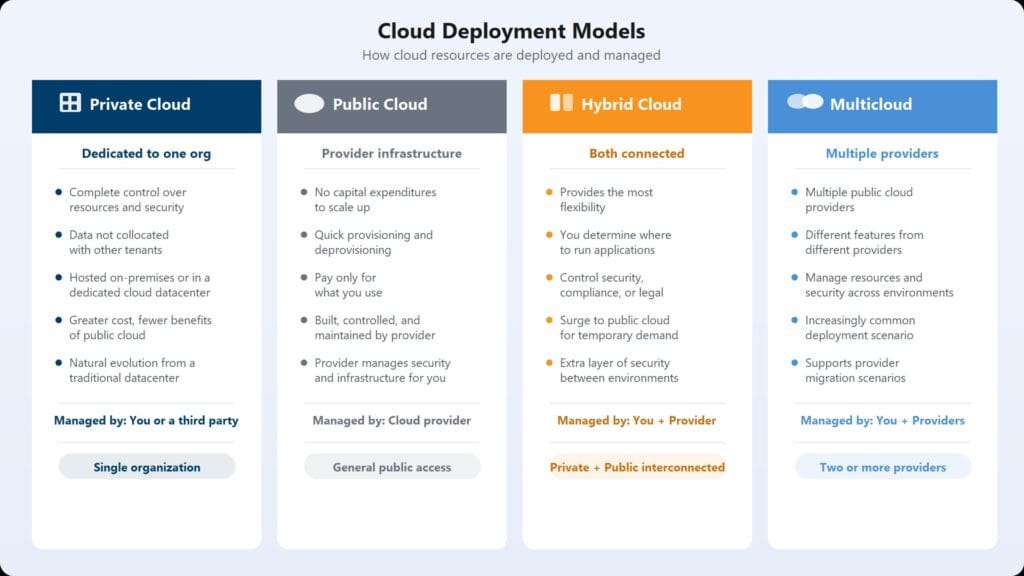
4. Cloud Deployment Types

Organizations can choose different deployment models based on their needs: Public Cloud, Private Cloud, Hybrid Cloud, or Multi‑Cloud.

  •  
Deployment TypeDescriptionExample
Public CloudServices delivered over the internet, shared infrastructureAzure/ AWS/ GCP
Private CloudDedicated infrastructure for one organizationVMware vSphere private cloud
Hybrid CloudCombination of public + private cloudAzure Arc, AWS Outposts
Multi‑CloudUsing multiple providers simultaneouslyAzure + AWS + GCP

Cloud Computing - Cloud Deployment Types

5. Microsoft Azure for Beginners!

Microsoft Azure is particularly great beginner‑friendly because it combines enterprise‑grade features with approachable tools and resources.

Seamless Integration with Microsoft Ecosystem
      • Azure works natively with Windows Server, Active Directory, Office 365, and Teams.
      • If you already use Microsoft products, Azure feels like a natural extension.
      • Example: You can extend your on‑premises Active Directory into Azure AD with minimal effort.
Rich Documentation and Tutorials
      • Microsoft Learn offers free, structured learning paths with labs and certifications.
      • Step‑by‑step guides, quickstarts, and sandbox environments make it easy to practice without risk.
Free Tier and Credits for Experimentation
      • Azure provides $200 free credits for new accounts and a 12‑month free tier for popular services.
      • This allows beginners to experiment with VMs, databases, and networking at zero cost.
Strong Hybrid Cloud Capabilities
      • Azure is designed for hybrid environments, bridging on‑premises and cloud seamlessly.
      • Tools like Azure Arc and Azure Stack let you manage workloads across data centers and cloud.
Enterprise‑Grade Security Made Simple
      • Built‑in compliance with ISO, GDPR, HIPAA, and more.
      • Security features like Azure Security Center and Defender for Cloud are easy to enable.
Community and Certification Pathways
      • Azure has a strong global community with forums, GitHub projects, and user groups.
      • Certifications like AZ‑900 (Azure Fundamentals) are beginner‑friendly and highly valued in IT careers.
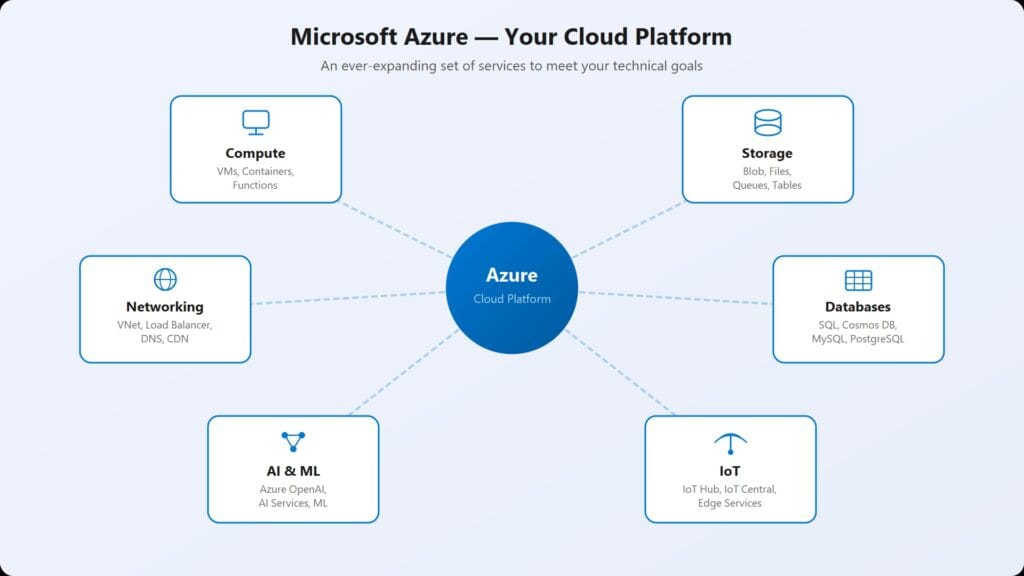

Cloud Computing - Azure Cloud Diagram

6. Key Takeaways

Key Points:

      • Cloud computing delivers IT resources over the internet.

      • Major providers: Azure, AWS, GCP, Oracle Cloud.

      • Service models: IaaS, PaaS, SaaS.

      • Deployment types: Public, Private, Hybrid, Multi‑Cloud.

      • Azure is a great starting point for IT professionals and beginners.

    • In the next post, we’ll dive into Azure account setup, free credits, and creating your first resource group — the foundation for deploying VMs, databases, and applications.

Pro Tip Before diving into Azure, sign up for free credits and explore the Azure Portal. Start small — create a resource group, deploy a VM, and experiment with networking. Taking snapshots or backups before changes will save you from costly mistakes.

Discover more:

Head over to our Blog page for the latest posts.

Share Your Thoughts

Your email address will not be published. Required fields are marked *

Scroll to Top