Top 50 Powerful Basic CMD & PowerShell Commands
For Daily Uses and Beginners
Command Prompt (CMD) and PowerShell are essential tools for Windows users. Whether you’re troubleshooting, configuring system settings, or managing files, these commands can save time and make you more efficient.
If you’d like to watch a step‑by‑step walkthrough of Windows server 2022 or Windows 11 installation, please visit our post-
- Create a Virtual Machine and Install Windows server 2022, For YouTube Video Click Here.
- Install Windows 11 with or without TPM on a VM, For YouTube Video Click Here.
Below are 50 useful commands with quick explanations.
Top 10 Basic Navigation & File Management commands
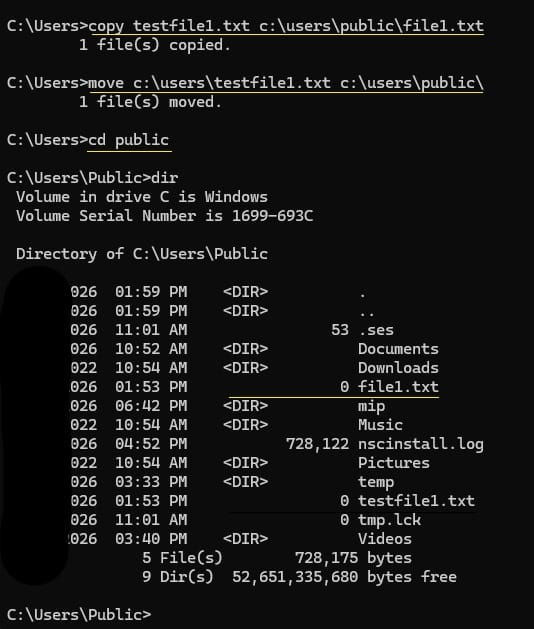
- cd – To changes directory.
- dir – Lists files and folders.
- cls – Clears the screen.
- copy filename.txt D:\ – Copies a file. Like copy source-file-name destination-path-or-file-name
- move filename.txt D:\ – Moves a file. Like move source-file-name destination-path-or-file-name

- del filename.txt – Deletes a file.
- mkdir Test – Creates a new folder. Like mkdir directoryname-or-Foldername
- rmdir Test – Removes a folder. Like rmdir directoryname-or-Foldername
- ren oldfilename.txt newfilename.txt – Renames a file.
- Attrib filename.txt – Displays or changes file attributes.
Top 10 System Information & Settings commands
- systeminfo – Shows system details.
- hostname – Displays computer name.
- ver – Shows Windows version.
- wmic os get caption – Displays OS name.
- tasklist – Lists running processes.
- taskkill /IM notepad.exe /F – Kills a running process forcefully.
- chkdsk – Checks disk/drive for errors.
- sfc /scannow – Scans and repairs system files.
- msinfo32 – Opens System Information tool.
- sysdm.cpl – Opens System Properties.
Top 10 Control Panel Shortcuts commands
- appwiz.cpl – Opens Programs & Features.
- ncpa.cpl – Opens Network Connections.
- inetcpl.cpl – Opens Internet Options.
- desk.cpl – Opens Display Settings.
- timedate.cpl – Opens Date & Time settings.
- firewall.cpl – Opens Windows Firewall settings.
- powercfg.cpl – Opens Power Options.
- mmsys.cpl – Opens Sound settings.
- main.cpl – Opens Mouse settings.
- control printers – Opens Printers window.
Top 10 Security & Certificates commands
- certmgr.msc – Opens current user Certificate Manager.
- certlm.msc – Opens local machine Certificate Manager.
- gpedit.msc – Opens Group Policy Editor.
- services.msc – Opens Services console.
- compmgmt.msc – Opens Computer Management.
- eventvwr.msc – Opens Event Viewer.
- perfmon.msc – Opens Performance Monitor.
- taskschd.msc – Opens Task Scheduler.
- lusrmgr.msc – Opens Local Users & Groups Management.
- regedit – Opens Registry Editor.
Top 10 Networking & Connectivity related commands
- ping google.com – Tests connectivity for any URL/Systemname/IP address.
- ipconfig – Shows IP configuration.
- ipconfig /all – Shows detailed IP and network information.
- ipconfig /release – Releases DHCP assigned IP address.
- ipconfig /renew – Renews IP address from DHCP server.
- nslookup google.com – Checks DNS resolution.
- tracert google.com – Traces route to host/URL/Systemname/IP address.
- netstat -an – Displays active connections.
- netsh wlan show profiles – Lists Wi-Fi profiles.
- netsh advfirewall show allprofiles – Shows firewall status for all profiles.
Many of these commands can be run in both CMD and PowerShell. If you are beginner, start with navigation and system info commands, then move on to networking and security tools as you get comfortable.