Top 50 Advanced CMD & PowerShell Commands
For Power Users and IT Administrators
Command Prompt (CMD) and PowerShell are essential tools for Windows users. Once youβve mastered the basics commands, itβs time to explore more advanced commands that can help with automation, troubleshooting, and system administration. These commands are especially useful for IT pros, but beginners can also benefit by learning how to manage Windows more efficiently.
If youβd like to watch a stepβbyβstep walkthrough of Windows server 2022 or Windows 11 installation, please visit our post-
- Create a Virtual Machine and Install Windows server 2022, For YouTube Video Click Here.
- Install Windows 11 with or without TPM on a VM, For YouTube Video Click Here.
Below are 50 advanced useful commands with quick explanations.
Top 10 Advanced File & Disk Management commands
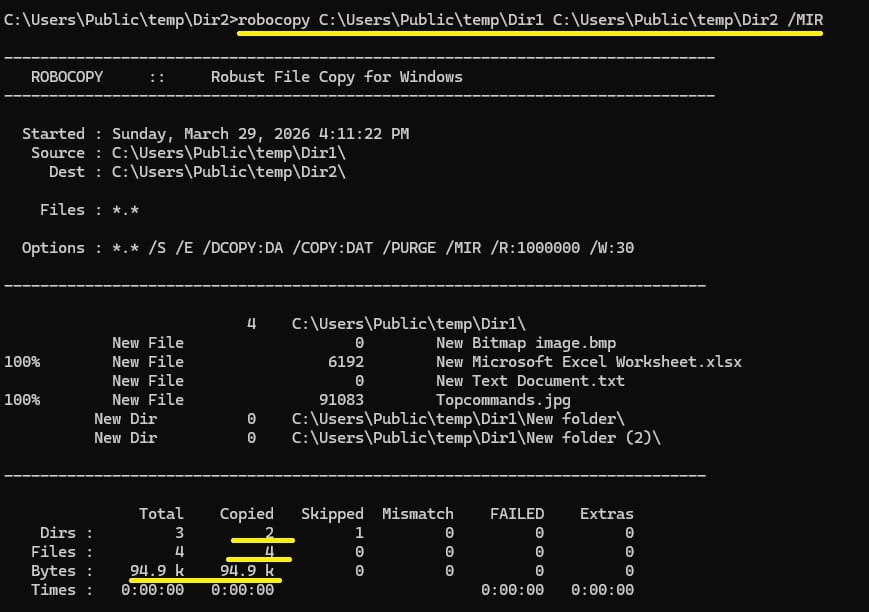
- robocopy C:\Source D:\Backup /MIR β Robust copy utility for copy, move, mirroring directories. Switches: /MIR mirrors source to destination, /R:3 retries 3 times, /LOG:log.txt saves log.

- xcopy C:\Source D:\Backup /E /H /C /I β Copies files with advanced options. Switches: /E copies subfolders, /H includes hidden files, /C continues on errors, /I assumes destination is a folder.
- fsutil file createnew test.txt 1000 β Creates a file of specific size (1000 bytes). Useful for testing disk performance or dummy files.
- cipher /E C:\Secret β Encrypts files/folders using NTFS encryption. Switches: /D decrypts, /W wipes free space securely.
- compact /C test.txt β Compresses a file to save disk space. Switches: /U uncompresses, /S applies to subdirectories.
- diskpart β Opens disk partition tool. Example: list disk, select disk 0, create partition primary.
- mountvol β Displays or manages mounted volumes. Example: mountvol Z: \\?\Volume{GUID}\ mounts a volume to drive Z.
- vol β Shows volume label and serial number. Example: vol C: displays info for C drive.
- tree C:\ β Displays folder structure in tree format. Switches: /F shows files, /A uses ASCII characters.
- fc file1.txt file2.txt β Compares two files line by line. Switches: /B binary comparison, /C ignores case.
- robocopy C:\Source D:\Backup /MIR β Robust copy utility for copy, move, mirroring directories. Switches: /MIR mirrors source to destination, /R:3 retries 3 times, /LOG:log.txt saves log.
Top 10 Advanced System Monitoring & Performance commands
- resmon β Opens Resource Monitor for CPU, memory, disk, and network usage.
- perfmon /report β Generates a system performance report (takes ~60 seconds).
- powercfg /energy β Analyzes energy efficiency issues. Output: Creates energy-report.html in system32.
- powercfg /batteryreport β Creates a battery health report. Output: Saves battery-report.html with charge cycles and capacity.
- driverquery /v β Lists installed drivers with details. Switches: /FO LIST formats output, /SI shows signed drivers.
- wmic cpu get name β Displays CPU model and details.
- wmic memorychip get capacity β Shows RAM capacity per chip (in bytes).
- tasklist /svc β Lists processes with associated services.
- taskkill /PID 1234 /F β Kills a process by PID. Switches: /IM processname kills by name, /T kills child processes.
- logman create counter MyLog -c “\Processor(_Total)\% Processor Time” -f csv -o C:\log.csv β Creates a performance counter log.
Top 10 User & Security Management commands
- net user β Lists all local users.
- net user TestUser /add β Creates a new user. Switches: /expires:never sets account to never expire.
- net localgroup administrators TestUser /add β Adds user to Administrators group.
- net accounts /minpwlen:10 β Sets minimum password length to 10.
- net accounts /maxpwage:30 β Sets maximum password age to 30 days.
- whoami /groups β Displays group memberships for current user.
- runas /user:Administrator cmd β Runs a program as another user.
- cipher /w:C:\ β Wipes free space securely (removes deleted data traces).
- auditpol /get /category:\* β Displays audit policy settings.
- secedit /export /cfg C:\secpol.cfg β Exports security policy to a file.
Top 10 Advanced Networking & Remote Management commands
- netsh interface ip show config β Shows IP configuration for all adapters.
- netsh wlan export profile name=”WiFiName” folder=C:\ β Exports Wi-Fi profile to XML.
- netsh advfirewall firewall add rule name=”BlockApp” dir=out program=”C:\app.exe” action=block β Blocks an app outbount connection in firewall.
- arp -a β Displays ARP table (IP to MAC mappings).
- nbtstat -n β Shows NetBIOS names registered locally.
- net use Z: \\Server\Share β Maps a network drive. Switches: /persistent:yes makes mapping permanent.
- net use Z: /delete β Disconnects mapped drive.
- mstsc /v:192.168.1.10 β Opens Remote Desktop to a host.
- shutdown /i β Opens GUI for remote shutdown/restart.
- shutdown /r /t 0Β β Restarts computer immediately. Switches: /s shuts down, /h hibernates.
Top 10 Advanced Task & Service Management commands
- sc query β Displays the status of a service. Usage: sc query spooler shows if the Print Spooler is running. Switches: sc start servicename, sc stop servicename to manage services.
- net start β Lists all running services. Usage: net start shows active services; net start wuauserv starts Windows Update service.
- net stop β Stops a running service. Usage: net stop spooler stops the Print Spooler service.
- tasklist β Lists all running processes. Switches: /svc shows services linked to processes, /fi applies filters. Usage: tasklist /fi “imagename eq notepad.exe” lists only Notepad.
- sc config β Changes service configuration. Usage: sc config spooler start= auto sets Print Spooler to autoβstart.
- schtasks /query β Displays scheduled tasks. Usage: schtasks /query /fo LIST /v shows detailed task info.
- schtasks /create β Creates a new scheduled task. Usage: schtasks /create /tn “Backup” /tr “C:\backup.bat” /sc daily /st 23:00 schedules a daily backup.
- schtasks /delete β Deletes a scheduled task. Usage: schtasks /delete /tn “Backup” removes the task named Backup.
- wmic service get name,startmode,state β Lists all services with startup type and current state. Usage: Helps quickly audit which services are autoβstart vs manual.
- wmic product get name,version β Lists installed programs with version numbers. Usage: Run in CMD or PowerShell to quickly inventory installed software.
Many of these commands can run in both CMD and PowerShell and require Administrator privileges. Always run CMD or PowerShell as Administrator when working with system, disk, or security commands.